Android Threema
06/02/2025 Friday
Threema for Android is a communication application that supports text,
audio, and video messaging, as well as secure file exchange and voice
and video calls between users. The application is developed in
Switzerland and is subject to Swiss data protection laws, which are
widely regarded as providing a high level of protection for individual
privacy.
Digital Forensics Values of Android Threema
Most of the artifacts left behind by the Threema application on Android
are encrypted. The ability to decrypt these files and extract data is
particularly important, as it may reveal significant information about a
user’s communications, usage behavior, and interaction patterns. Such
data can contribute to reconstructing timelines, understanding contact
relationships, and identifying communication patterns.
Location of Android Threema
Android Threema artifact can be found at the following locations:
data\data\ch.threema.app\shared_prefs\ch.threema.app_preferences.xml
data\data\ch.threema.app\databases\threema4.db
data\data\ch.threema.app\databases\threema-fs.db
data\data\ch.threema.app\files\key.dat
data\media\0\Android\data\ch.threema.app\files\data\.avatar
data\media\0\Android\data\ch.threema.app\files\data
Analyzing Android Threema Artifacts with ArtiFast
This section will discuss how to use ArtiFast to extract Android Threema
artifacts from Android machines’ files and what kind of digital
forensics insights we can gain from the artifact.
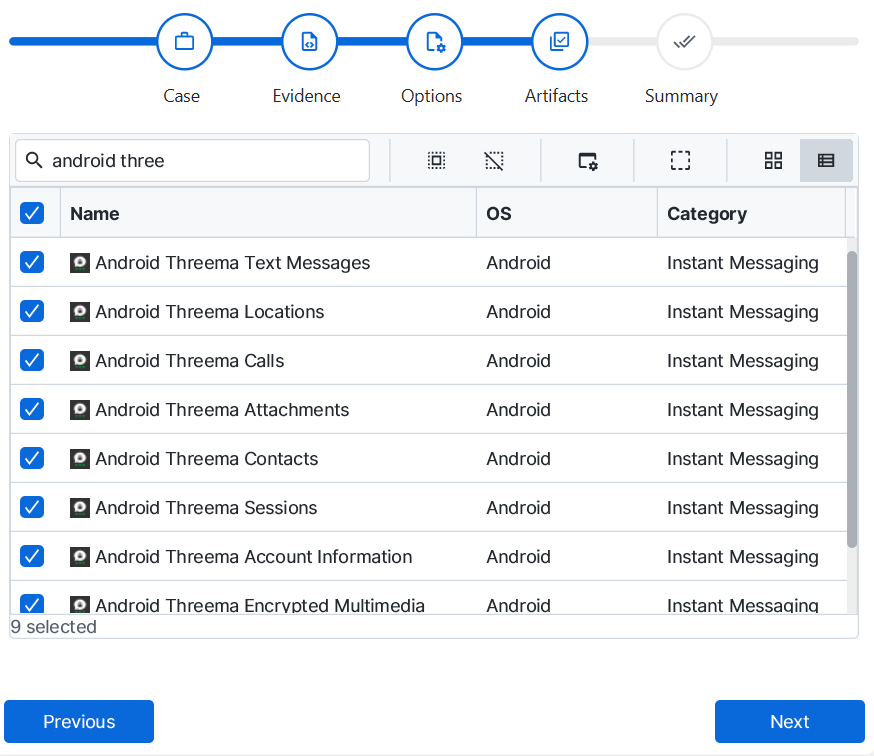
After you have created your case and added evidence for the
investigation, at the Artifact Selection phase, you can select Android
Threema artifact parser:
×
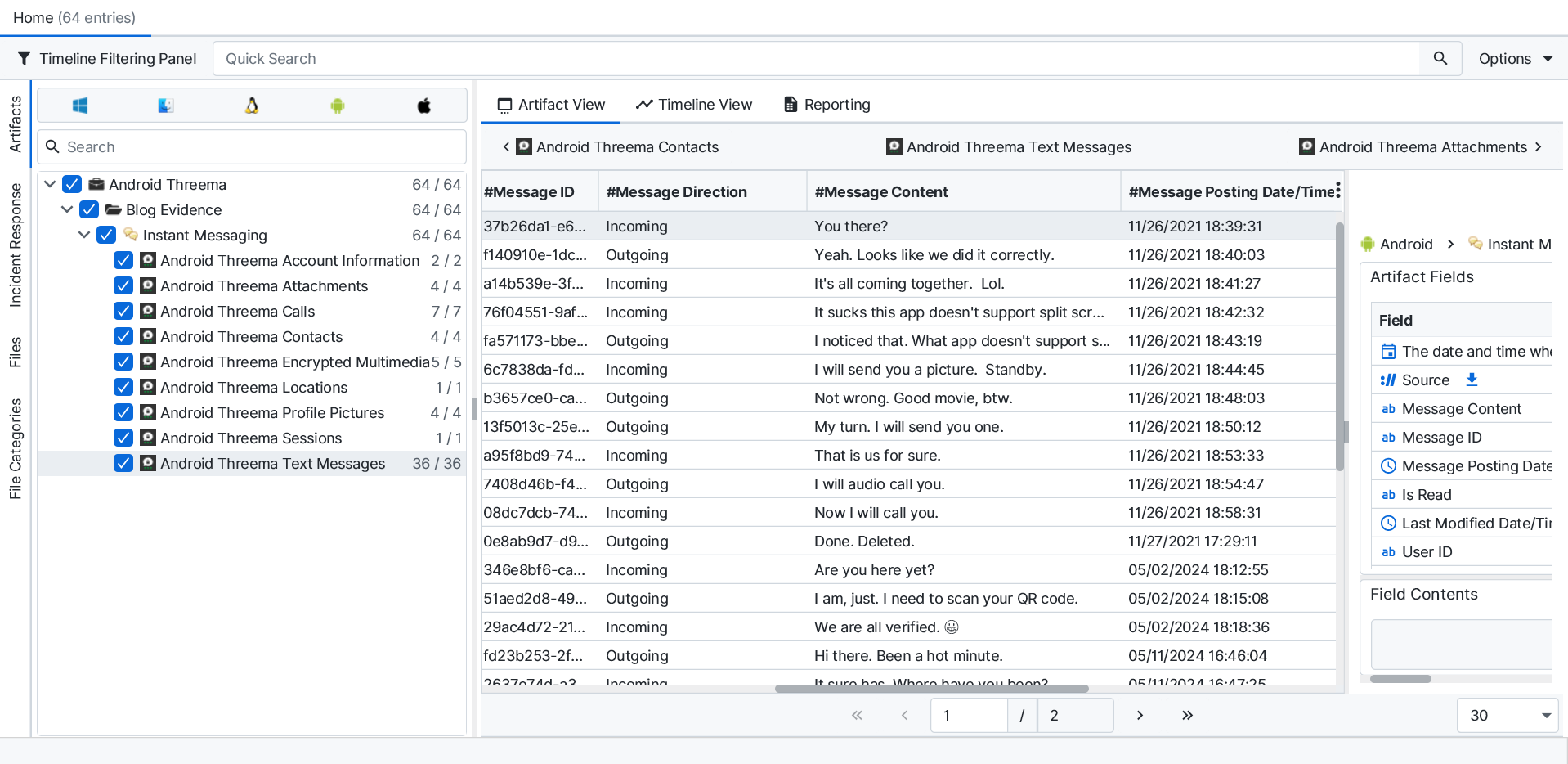
Once ArtiFast parsers plugins complete processing the artifact for analysis, it can be reviewed via “Artifact View” or “Timeline View,” with indexing, filtering, and searching capabilities. Below is a detailed description of Android Threema artifacts in ArtiFast.
Android Threema Text Messages
- Message ID: The unique identifier of the message.
- Message Direction: Indicates whether this is an outgoing or incoming message.
- Is Read: Indicates whether the message was read or not.
- Is Saved: Indicates whether the message was saved or not.
- Message Posting Date/Time: The date/time when this message has been arrived to the conversation page.
- Last Modified Date/Time: The date/time when this message has been modified.
- Message Creation Date/Time: The date and time when this message was created by the user.
- User ID: The user ID of the remote party in which this account user is communicating with.
- Message Content: The text content of this message.
Android Threema Locations
- Message ID: The unique identifier of the message.
- Message Direction: Indicates whether this is an outgoing or incoming message.
- Is Read: Indicates whether the message was read or not.
- Is Saved: Indicates whether the message was saved or not.
- Message Posting Date/Time: The date/time when this message has been arrived to the conversation page.
- Last Modified Date/Time: The date/time when this message has been modified.
- Message Creation Date/Time: The date and time when this message was created by the user.
- User ID: The user ID of the remote party in which this account user is communicating with.
- Latitude: The Latitude associated with this location.
- Longitude: The Longitude associated with this location.
- Location Title: This location information.
- Location Name: The text description of this location.
Android Threema Calls
- Message ID: The unique identifier of the message.
- Is Read: Indicates whether the message was read or not.
- Is Saved: Indicates whether the message was saved or not.
- User ID: The user ID of the remote party in which this account user is communicating with.
- Call Date/Time: Message Sending Date/Time.
- Call ID: The unique identifier of the call.
- Call Direction: Indicates whether this is an outgoing or incoming message.
- Call Duration: The duration of this call in seconds.
- Call Status: The status of the message.
Android Threema Attachments
- Message ID: The unique identifier of the message.
- Message Direction: Indicates whether this is an outgoing or incoming message.
- Is Read: Indicates whether the message was read or not.
- Is Saved: Indicates whether the message was saved or not.
- Message Posting Date/Time: The date/time when this message has been arrived to the conversation page.
- Last Modified Date/Time: The date/time when this message has been modified.
- Message Creation Date/Time: The date and time when this message was created by the user.
- User ID: The user ID of the remote party in which this account user is communicating with.
- Attachment Name: The name of this attachment file.
- Attachment MIME Type: The type of the data stored in this attachment file.
- Attachment Size: The size of this attached file.
Android Threema Contacts
- User ID: The user ID of the account in which this message is belonging to.
- First Name: This user first name.
- Last Name: This user last name.
- Status: This account status.
- User Name: The User public nick name.
- Account Created Date/Time: This account creation date and time.
Android Threema Sessions
- User ID: The user ID of this account user.
- Remote Party User ID: The user ID of the remote party in which this account user is communicating with.
- Session ID: This session unique identifier.
- User Chain Key: The hexadecimal representation of this user chain key.
- Remote Party Chain Key: The hexadecimal representation of the remote party chain key.
- User Public Key: The hexadecimal representation of this user public key.
Android Threema Account Information
- User ID: The user ID of this account user.
- User Name: This account user name.
- Phone Number: This user phone number.
Android Threema Encrypted Multimedia
- Image Bytes: The product catalog image bytes.
- File Name: The name and extension of the image.
- Created Date/Time: The created date/time of the image in the file system.
- Last Accessed Date/Time: The last accessed date/time of the image in the file system.
- Last Modified Date/Time: The last modified date/time of the image in the file system.
- Size: The size of the image in bytes.
- File Path: The URL of the image file.
Android Threema Profile Pictures
- Image Bytes: The product catalog image bytes.
- File Name: The name and extension of the image.
- Created Date/Time: The created date/time of the image in the file system.
- Last Accessed Date/Time: The last accessed date/time of the image in the file system.
- Last Modified Date/Time: The last modified date/time of the image in the file system.
- Size: The size of the image in bytes.
- File Path: The URL of the image file.
For more information or suggestions please contact: kalthoum.karkazan@forensafe.com
