Investigating iOS Life360
04/09/2026 Friday
Life360 is a location-sharing and family safety application used to
share locations between trusted Circle members. On iOS devices, Life360
application data includes shared location activity, Circle member
details, in-app chat messages, and device battery status records when
the related application database and log files are available.
Digital Forensics Value of iOS Life360
iOS Life360 artifacts can provide valuable context in investigations
where movement history, user relationships, and location-based
communication need to be reviewed. Location records can preserve
coordinates, altitude, speed, heading, accuracy, activity type, and
device battery state, which can help reconstruct travel patterns and
compare reported movement with other iOS location artifacts. Member
records may identify the Circle users connected to the account, while
chat messages may show communication, read status, delivery status,
reactions, and location-linked message content. Together, these records
can support timeline reconstruction, association of users to a shared
Circle, verification of location-sharing activity, and correlation with
system logs, application usage, network activity, and other GPS
evidence.
Location of iOS Life360
iOS Life360 artifacts are commonly associated with the Life360
application data container and shared app-group log storage. The parsed
records are associated with the following generic paths:
/private/var/mobile/Containers/Data/Application/<APP_UUID>/Library/Application
Support/Messaging.sqlite
/private/var/mobile/Containers/Shared/AppGroup/<APP_GROUP_UUID>/SidecarLPSE/com.life360.safetymap
<TIMESTAMP>.log
/private/var/mobile/Containers/Shared/AppGroup/<APP_GROUP_UUID>/MainApplication/Logs/com.life360.safetymap
<TIMESTAMP>.log
The <APP_UUID> and <APP_GROUP_UUID> values represent
iOS-assigned container identifiers, and <TIMESTAMP> represents the
date and time pattern used in Life360 log filenames.
Analyzing iOS Life360 Artifacts with ArtiFast
This section will discuss how to use ArtiFast to extract iOS Life360
artifacts from iOS device files and what kind of digital forensics
insights can be gained from the artifacts.
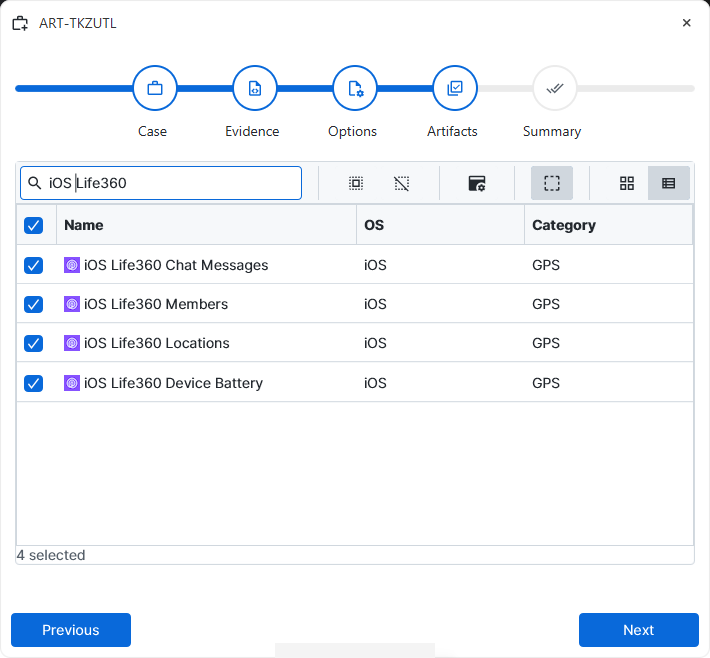
After a case has been created and evidence has been added for the
investigation, at the Artifact Selection phase, the iOS Life360 artifact
parsers can be selected:
×
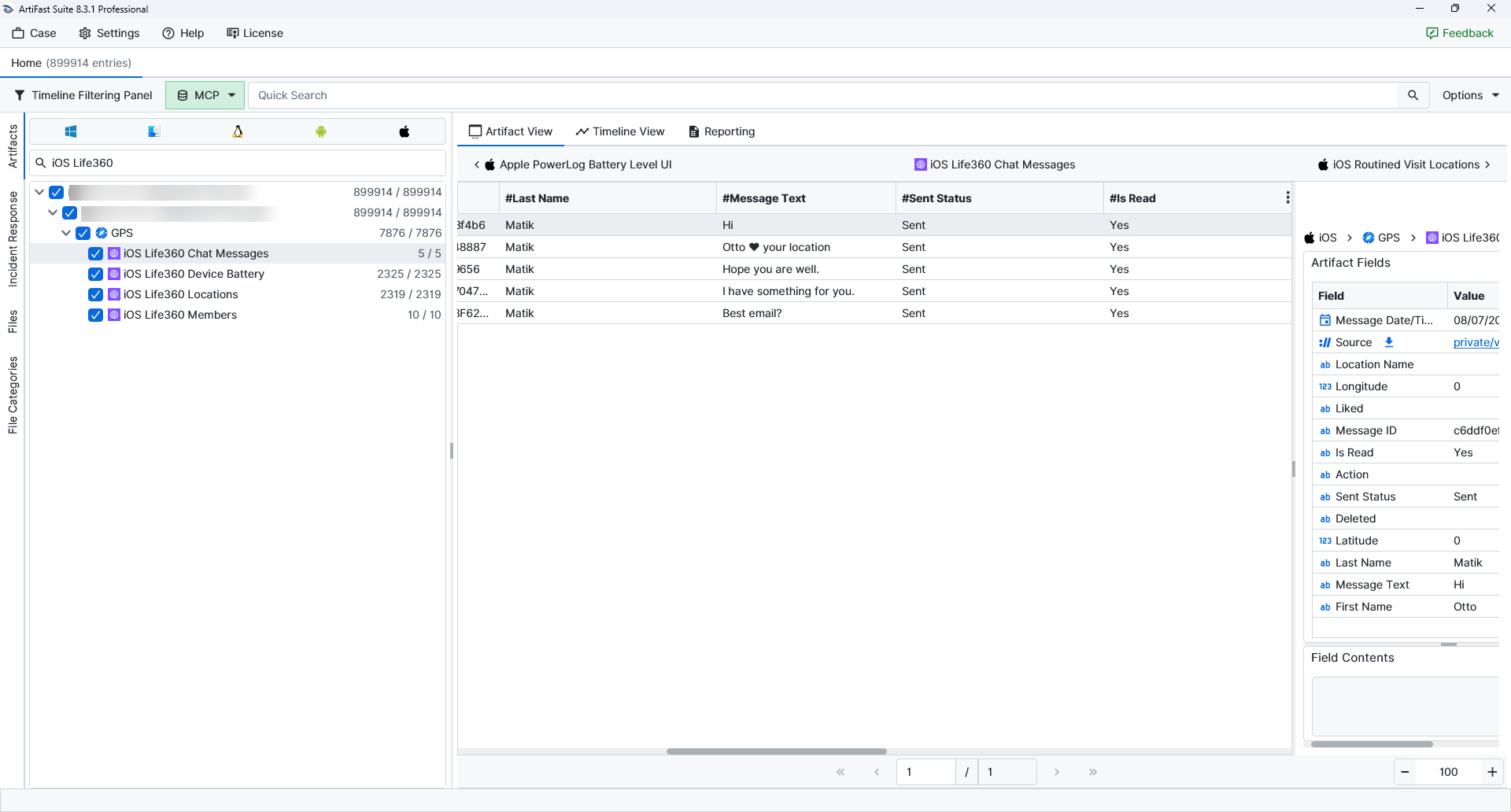
Once the ArtiFast parser plugins complete processing the artifacts for analysis, they can be reviewed via Artifact View or Timeline View, with indexing, filtering, and searching capabilities. Below is a detailed description of iOS Life360 artifacts in ArtiFast.
iOS Life360 Chat Messages
- Message ID: Preserves the unique identifier assigned to the message record.
- First Name: Lists the first name of the Life360 member tied to the message.
- Last Name: Lists the last name of the Life360 member tied to the message.
- Message Text: Contains the text or location-reaction content retained in the chat record.
- Sent Status: Notes the delivery state recorded for the message.
- Is Read: Indicates whether the message had been marked as read.
- Deleted: Stores the deletion-related value when one was retained for the message.
- Liked: Keeps the liked or reaction state.
- Action: Describes an associated message action.
- Location Name: Records the named place or address linked to a location-bearing message.
- Latitude: Stores the latitude coordinate attached to the message.
- Longitude: Stores the longitude coordinate attached to the message.
iOS Life360 Members
- Member ID: Preserves the unique Life360 identifier assigned to the Circle member.
- First Name: Records the member's first name as stored by Life360.
- Last Name: Records the member's last name as stored by Life360.
- Email Address: Contains the email address associated with the member account.
- Phone Number: Contains the phone number associated with the member account.
- Local User: Indicates whether the member record is associated with the local device user.
- Admin: Marks whether administrative status was recorded for the member in the Circle.
- Circle Name: Identifies the Life360 Circle linked to the member record.
- Avatar URL: References the profile image URL retained for the member.
iOS Life360 Locations
- Latitude: Stores the latitude coordinate for the recorded location.
- Longitude: Stores the longitude coordinate for the recorded location.
- Altitude: Preserves the elevation value associated with the location sample.
- Speed (MPS): Records the speed value in meters per second when available.
- Heading: Keeps the direction or bearing value logged with the location sample.
- Accuracy: Provides the horizontal accuracy value retained for the location fix.
- Vertical Accuracy: Provides the accuracy value associated with altitude.
- Location Precision: Identifies the precision level recorded for the location.
- Location Mode: Describes the location context saved by Life360.
- Activity Type: Records the activity classification associated with the location sample.
- Device Battery: Captures the reported battery level near the time of the location record.
- Device Charging: Indicates whether the device was charging.
- Age: Preserves the freshness or age value associated with the location sample.
iOS Life360 Device Battery
- Device Battery: Stores the reported device battery level.
- Device Charging: Indicates whether the device was charging.
For more information or suggestions please contact: enes.turan@forensafe.com
